DLP Validator — Complete Guide
Feature-by-feature walkthrough of every capability in the DLP testing suite.
On This Page
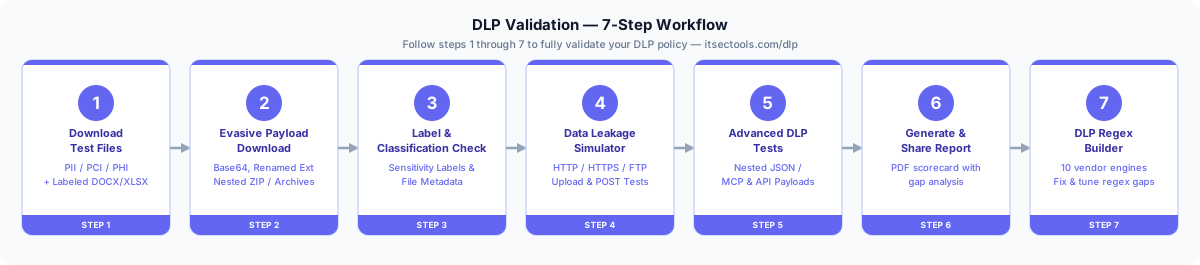
Recommended testing flow: ① Download Test Files → ② Evasive Payload Download → ③ Label & Classification Check (optional) → ④ Data Leakage Simulator → ⑤ Advanced DLP Tests → ⑥ Generate & Share Report → ⑦ DLP Regex Builder
1. Download Test Files
Generate dynamic documents with realistic compliance test data patterns for DLP testing. Each payload creates a unique file — preventing static hash fingerprinting from bypassing your DLP.
Available Data Types
- PII (Personally Identifiable Information) — Social Security Numbers, names, addresses, phone numbers, dates of birth.
- PCI (Payment Card Industry) — Credit card numbers (Visa, MasterCard, Amex), CVVs, expiration dates, cardholder names.
- PHI (Protected Health Information) — Medical record numbers, patient names, diagnosis codes, treatment records.
- Sensitivity-Labeled Files — DOCX/XLSX with embedded MIP labels (Confidential, Internal, Public) for testing label-aware DLP policies.
Available File Formats
Downloads are generated with embedded PII, PCI, and PHI data over HTTPS. This tests whether your DLP engine can intercept and inspect file content during transit — not just at the endpoint level.
- CSV — Plain text. Easily parseable by all DLP engines.
- XLSX — XML-based spreadsheet inside a ZIP archive. Most DLP engines parse this reliably.
- DOCX — OOXML ZIP archive. DLP must decompress and parse
word/document.xml. - PDF — Binary format with compressed content streams. Requires deep PDF parsing by the DLP engine.
2. Evasive Payload Download
Generate real test files that challenge your DLP engine's inspection depth using common evasion techniques. These are actual downloadable files — not simulated traffic — designed to test how deeply your DLP inspects content.
Renamed Extensions
A valid DOCX with sensitive data saved as .jpg or .png. Tests whether your DLP inspects file magic numbers rather than trusting the extension.
Base64 Encoding
Sensitive text (SSN, credit cards) obfuscated into Base64. Tests if your DLP can decode and inspect Base64-encoded content in transit.
Password-Protected Archives
AES-256 encrypted ZIP files with sensitive documents inside. Tests your DLP's fail-close vs. fail-open policy— does it block archives it can't inspect?
Nested Archives
Sensitive data wrapped inside multiple ZIP layers (ZIP-in-ZIP-in-ZIP). Tests your DLP's maximum archive extraction depth — most solutions stop at 2–3 levels.
3. Label & Classification Check (optional)
Upload any document to deep-scan it for sensitivity labels, classification markings, content-level DLP patterns, and file integrity hashes. Use this to verify that files downloaded in Step 1 have the correct sensitivity labels embedded before running upload tests.
Detection Methods
- DOCX/XLSX Label Extraction — Reads Microsoft Information Protection (MIP) labels from
docProps/custom.xmlinside the ZIP archive. Detects Confidential, Internal, Public, Top Secret. - PDF Metadata Scanning — Extracts Classification and Label properties from PDF metadata dictionaries using raw binary parsing.
- Content-Level DLP Matching — Scans file content for PII patterns (SSN), PCI data (credit card numbers), and keyword-based classification markers.
- File Integrity Hashing — Computes MD5 and SHA-256 hashes for verification and threat intelligence lookups.
Color-Coded Results
- ● Red — Confidential / Secret / Top Secret
- ● Blue — Internal / Restricted
- ● Green — Public / Unclassified
4. Data Leakage Simulator
Upload files and send raw text payloads through HTTP, HTTPS, and FTP — or paste sensitive data into a simulated AI chat prompt — to verify whether your DLP solution inspects and blocks data in transit across every channel, including Shadow AI.
File Upload Test — How to Use
- Navigate to DLP Validator → Data Leakage Simulator tab.
- Select your file using the file picker (use files from Step 1 or Step 2).
- Choose a protocol: HTTP (port 80), HTTPS (port 443), or FTP (port 21).
- Click the upload button for your chosen protocol.
- Check the result — a blocked status confirms your DLP is inspecting traffic on that channel.
Raw Text POST Test
Sends inline sensitive text (SSN, credit card numbers) via HTTP or HTTPS POST — without a file wrapper. Tests whether your DLP scans data-in-motion, not just file attachments.
- Select the Text POST option within the Data Leakage Simulator tab.
- Enter or paste text containing sensitive data (e.g.,
SSN: 123-45-6789). - Click Send POST — if your DLP inspects inline traffic, it should detect and block the request.
Shadow AI Chat Data Leakage Simulation
A simulated AI chat interface for testing the fastest-growing exfiltration path: an employee pasting sensitive data into ChatGPT, Copilot, or an internal AI assistant instead of uploading a file.
- Select the Shadow AI Chat Data Leakage Simulation panel within the Data Leakage Simulator tab.
- Send the pre-filled sample prompt (a synthetic SSN and card number) or type your own.
- Each message reports a plain Success or Failed to send — check whether your DLP/CASB console shows anything for it.
- Toggle Include in report to opt a specific test into the PDF report (off by default, so casual messages don't inflate the results).
The request is shaped like real chat-completions traffic — path /v1/chat/completions, the same request/response schema OpenAI (and now Azure OpenAI, Ollama, vLLM, and most self-hosted LLM servers) use — so it exercises content-based DLP/CASB inspection of AI-chat payloads, not just generic form data.
ITSecTools is the only free tool that detects when an Endpoint DLP agent (Forcepoint, Symantec) blocks an upload at the browser level — before data even leaves the machine. It clearly distinguishes endpoint-level blocks from network/proxy DLP blocks with an actionable message:
5. Advanced DLP Tests
Tests whether your DLP can detect sensitive data buried inside deeply nested JSON structures — the same format used by AI agents (MCP), REST APIs, and GraphQL mutations. Sensitive data is generated server-side and wrapped at configurable nesting depths, requiring the DLP engine to parse JSON to find it.
How to Use
- Navigate to DLP Validator → Advanced DLP Tests tab.
- Select Data Type (PII, PCI, or PHI).
- Select Nesting Depth (2, 4, or 6 levels deep) — deeper nesting is harder for DLP to parse.
- Select Protocol (HTTP or HTTPS).
- Click Send Nested JSON Test and review the JSON preview to see the exact payload sent.
What It Tests
- JSON parsing depth — Can your DLP find an SSN buried 4–6 levels deep inside a JSON object?
- Content-Type awareness — Does your DLP inspect
application/jsonpayloads, or only form data? - API/AI exfiltration — MCP, REST APIs, and GraphQL transmit data in nested JSON. Can your DLP detect leakage through these channels?
- LEAKED — DLP failed to detect the sensitive data inside the nested JSON.
- BLOCKED — DLP detected and blocked the sensitive data inside the JSON payload.
6. Generate & Share Report
After running tests in Steps 4 and 5, the Generate Report button becomes active automatically. Click it to download a branded PDF scorecard with a score gauge, protocol coverage matrix, detailed test results, gap analysis, and actionable recommendations. The report is generated entirely client-side — no data leaves your browser.
What the Report Includes
- Score gauge — visual percentage showing how many tests were blocked vs. leaked.
- Protocol coverage bars — per-protocol breakdown (HTTP, HTTPS, FTP, MCP) showing blocked/total.
- Test details table — every test with timestamp, protocol, file/content, and result.
- Gaps identified — automatically detected weaknesses based on test results.
- Recommendations — actionable steps to close the identified gaps.
7. DLP Regex Builder
Use test results from Steps 4 and 5 to identify regex gaps, then build or translate vendor-optimized patterns here. Supports 10 DLP vendor engines — build from a sample string or translate an existing pattern.
Regex Creator — How to Use
- Navigate to DLP Validator → DLP Regex Builder tab, then select Regex Creator.
- Enter a sample text (e.g.,
MRN:1234567). - Click Analyze — the tool auto-detects each segment's type (letters, digits, separator, etc.).
- Refine each segment's match type and quantity as needed.
- Select your target DLP vendor and click Generate Regex.
- Optionally enter a test string and click Test to validate the pattern.
Regex Translator — How to Use
- Select Regex Translator within the DLP Regex Builder tab.
- Paste your existing regex pattern into the input field.
- Select your target DLP vendor.
- Optionally enter a test string to validate the translated pattern.
- Click Translate & Test — the tool outputs the vendor-optimized regex.