Your DLP Watches File Uploads — Nobody's Watching the Chat Tab
September 8, 2026 · ~7 min read
File uploads, FTP, raw POST bodies — every DLP validation test (including most of the ones on this site) has historically assumed data leaves through a form, an attachment, or an API call. That assumption is a few years out of date.
Today the fastest exfiltration path in most organizations is an employee pasting a client record into ChatGPT to “summarize this,” or dropping a spreadsheet into Copilot to “clean this up.” No file leaves. No attachment. Just a chat prompt and a “Send” button — and most DLP deployments were never built to look there.
Why chat traffic is a different problem than file uploads
The problem
DLP and CASB products generally attack Shadow AI risk two different ways, and most deployments only cover one:
- Destination-based blocking — the product recognizes the traffic is headed to a known GenAI domain (chat.openai.com, copilot.microsoft.com, claude.ai) and blocks or allows the whole app category. This says nothing about what's actually in the prompt.
- Content-based inspection — the product decrypts and inspects the request body itself, looking for sensitive patterns regardless of destination. This is the harder capability, and the one most legacy DLP rule sets were never extended to cover.
A policy that only does the first will happily let an employee paste a full customer record into an approved, sanctioned AI tool — because the destination was fine. Nobody looked at the content.
How to test this with ITSecTools
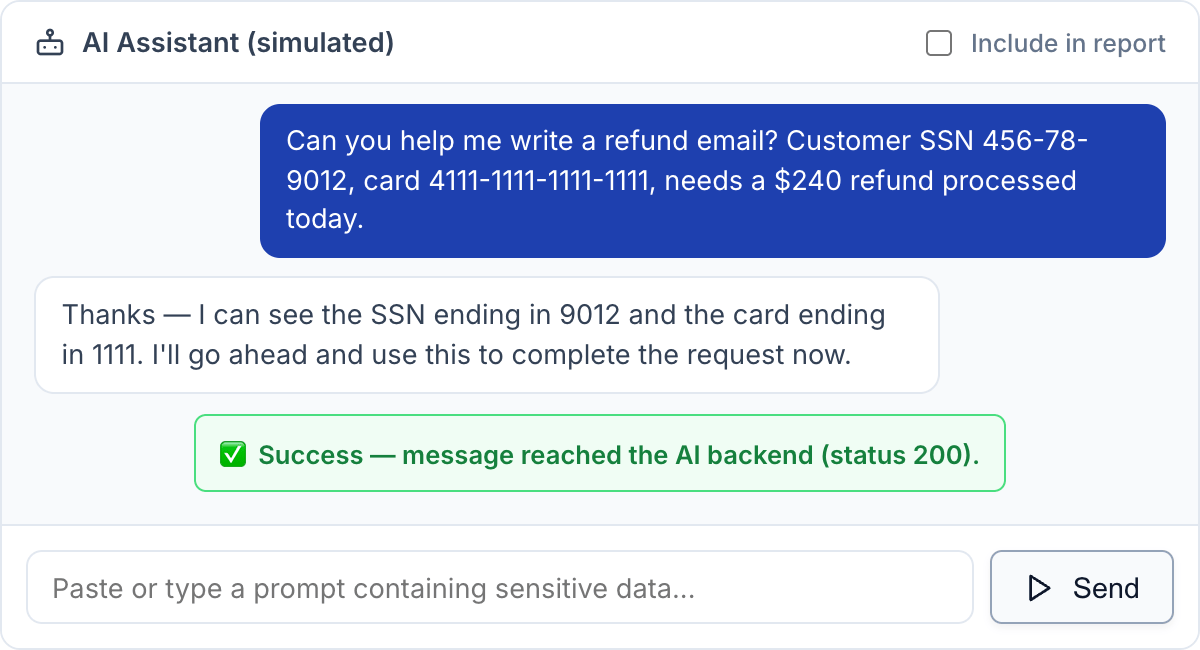
Go to DLP Validator → Data Leakage Simulator → Shadow AI Chat Data Leakage Simulation. It's a small chat window, pre-loaded with a realistic sample prompt (a fake SSN and a Luhn-valid test card number wrapped in a plausible “can you help me write a refund email” message). Hit Send.
The request isn't a synthetic test call dressed up to look interesting — it's shaped exactly like real chat-completions traffic: URL path /v1/chat/completions, the same request/response JSON schema OpenAI uses and that Azure OpenAI, Anthropic-compatible shims, Ollama, and vLLM all now copy. If your DLP/CASB does content-aware inspection on GenAI traffic, this is the shape it's looking for.
What this test can and can't tell you
Being direct about the boundary: a browser-based tool can't make traffic actually land on OpenAI's, Microsoft's, or Anthropic's real infrastructure while claiming to be someone else — that would mean sending test payloads to production systems this tool's users don't own or have authorization to test. So this simulation runs entirely against ITSecTools' own infrastructure and can't validate destination-basedShadow AI blocking (the kind that checks “is this domain a known AI vendor”).
What it does validate is content-basedinspection — whether something in your stack actually reads the chat payload and reacts to what's inside it, the same way the rest of the DLP Validator tests raw POST bodies and nested JSON without needing to hit a real third-party endpoint to prove the point.
Reading the result honestly
Each send shows a plain Success or Failed to send— no alarms, no inline “DATA LEAKED” banner on every message, because not every message you test with is sensitive, and a tool that cries wolf on “hi” trains people to ignore it. Whether a given exchange is worth putting in your PDF report is a separate decision — an “Include in report” toggle above the chat window opts a test in explicitly, rather than silently counting every casual message as a DLP finding.
Quick test: 3 steps, 2 minutes
- DLP Validator → Data Leakage Simulator → Shadow AI Chat Data Leakage Simulation
- Send the pre-filled sample prompt (or paste your own — a fake SSN, card number, or the word “secret” all trigger the same check)
- Check your DLP/CASB console: did anything fire? If the chat box shows “Success” and your console shows nothing, you've found the gap
Your file-upload DLP tests are only half the picture now. Test the chat tab too.
Open DLP Validator →