ITSecTools vs Other Security Testing Tools — What's Actually Different
February 26, 2026 · ~10 min read
If you work in network security, you've probably tried a handful of tools for testing DLP policies, firewall rules, or IPS signatures. Some are decent. Most are narrow. They do one thing, give you a pass/fail, and leave you guessing about the rest.
ITSecTools was built to cover the full testing surface that security teams actually need — DLP, NGFW, IPS, threat simulation, and MITRE ATT&CK — from a single browser tab, with no agents, no appliances, and no subscription.
This isn't a marketing comparison chart. This is a breakdown of what's actually different, feature by feature.
1. DLP Testing
What most tools do
Upload a file. See if it gets blocked. That's the entire test. You get a binary result — allowed or denied — with no insight into how the file was inspected, whether evasion would work, or if your policy only catches the obvious case.
What ITSecTools does differently
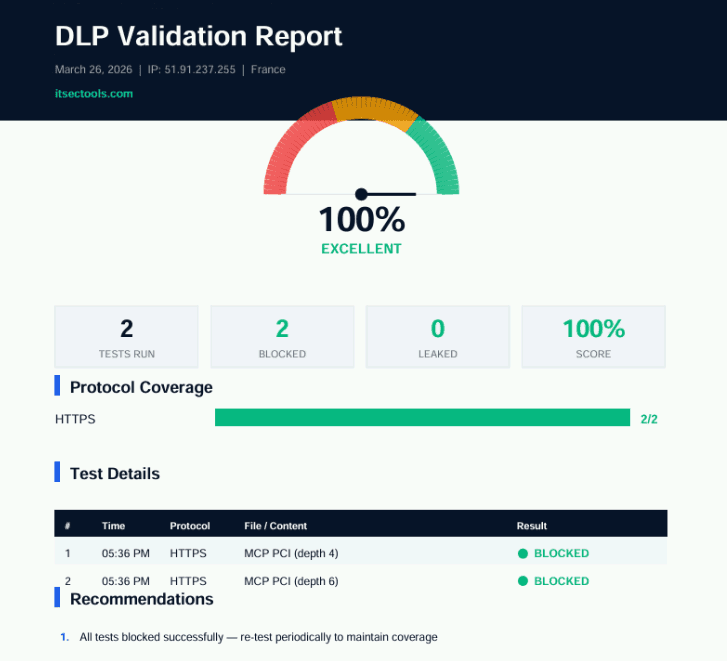
ITSecTools gives you 5 distinct DLP testing methods: HTTP upload, HTTPS upload, FTP upload, HTTP/S text POST, and sample data download. Each method exercises a different inspection path in your proxy or DLP gateway, because in production, data doesn't always leave through the same door.
On top of that, you get evasion payloadsthat test whether your DLP engine handles real-world obfuscation: Base64-encoded content, renamed file extensions, AES-256 encrypted payloads, and nested ZIP archives. These are the techniques that attackers actually use — and the ones that expose gaps in pattern-matching-only DLP policies.
ITSecTools also inspects file labels and metadata, including Microsoft Information Protection (MIP) sensitivity labels extracted from DOCX, XLSX, and PDF files. If your DLP policy relies on classification labels, you can verify they're actually present and correctly applied before trusting the policy to enforce them.
And there's one capability no other free tool offers: Endpoint DLP agent detection. ITSecTools detects and reports when endpoint DLP agents — such as Forcepoint or Symantec — intercept uploads at the browser level. This means you can distinguish between a network DLP block (proxy-side) and an endpoint DLP block (agent-side), which is critical when troubleshooting layered DLP architectures.
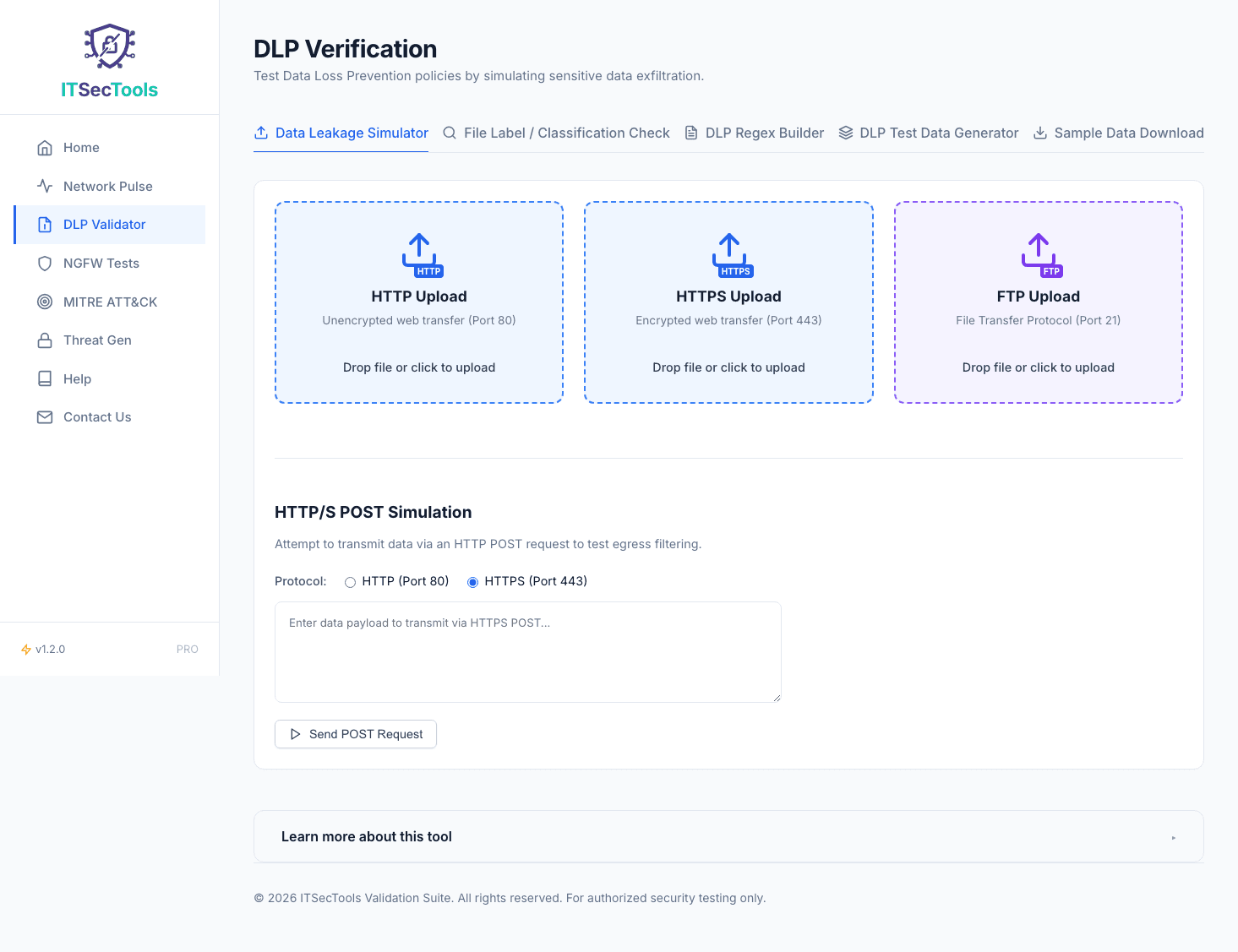
And the newest addition: Advanced DLP Tests with Nested JSON Exfiltration. AI agents (MCP), REST APIs, and GraphQL mutations all transmit data in deeply nested JSON structures. ITSecTools is the only free tool that tests whether your DLP can detect sensitive data buried inside these payloads at configurable depths (2, 4, or 6 levels). Most DLP engines only scan flat text — this test exposes a critical blind spot.
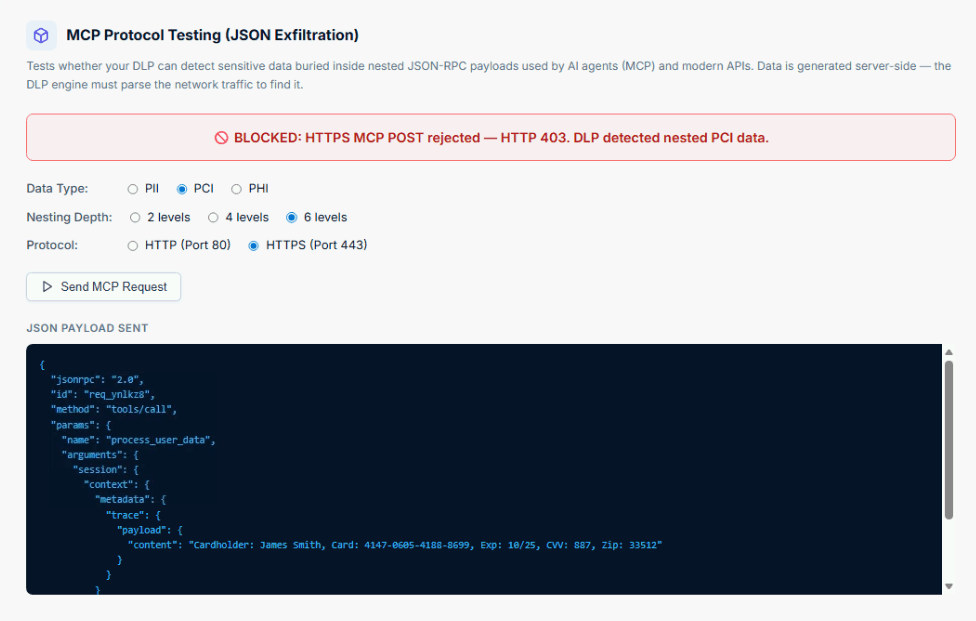
After running your tests, generate a branded PDF validation report with a score gauge, protocol coverage, gap analysis, and recommendations — ready to share with your CISO.
2. Test Data Generation UNIQUE
What most tools do
Nothing. You're on your own. Most security teams end up manually creating test files with fake sensitive data, copy-pasting example SSNs into a Word document, or reusing the same stale test file for months. If the DLP engine has already seen the hash, it catches it. If the content changes even slightly, you have no idea whether the policy still works.
What ITSecTools does differently
ITSecTools dynamically generates realistic test documentsin 4 formats — CSV, XLSX, PDF, and DOCX — each containing 100 rows of synthetic sensitive data. You pick the data category:
- PII: Social Security Numbers, Driver License numbers, Passport numbers
- PCI: Luhn-valid credit card numbers for Visa, Mastercard, and American Express
- PHI: ICD-10 codes, prescription data, Medical Record Numbers
That's 12 combinations of format and data type, all generated on-the-fly with no static file hashes. Every download is unique.
This is how you actually find gaps in your DLP policy: generate a PDF with 100 SSNs, download it through your proxy, and see if DLP catches it. Then try the same data in a CSV. Then try XLSX. You'd be surprised how many DLP engines catch one format but miss another.
No competitor offers this. It's the fastest way to validate that your DLP content inspection is working across file types, not just for the one test file you've been reusing since last year.
3. DLP Regex Engine
What most tools do
You open regex101.com, write your pattern, test it against a sample string, and call it done. It's a great general-purpose regex tool. But it doesn't know that Symantec DLP uses a different regex flavor than Microsoft Purview, or that Forcepoint handles character classes differently than Palo Alto.
What ITSecTools does differently
ITSecTools builds and translates regex patterns across 10 DLP vendor engines. Write your pattern once, and see how it needs to be adapted for each platform. The engine provides token-by-token failure analysis, so when a pattern doesn't match, you know exactly which part broke and why — not just that it failed.
If you've ever spent an afternoon debugging why a regex that works in Python doesn't work in your DLP console, this is the tool that eliminates that friction.
4. NGFW and IPS Testing
What most tools do
Enterprise-grade tools like BreakingPoint and Keysight are powerful, but they require dedicated hardware appliances, agent software, or expensive subscriptions. Free alternatives are scarce, and the ones that exist usually only test over HTTP — which doesn't validate whether your firewall is actually decrypting and inspecting HTTPS traffic.
What ITSecTools does differently
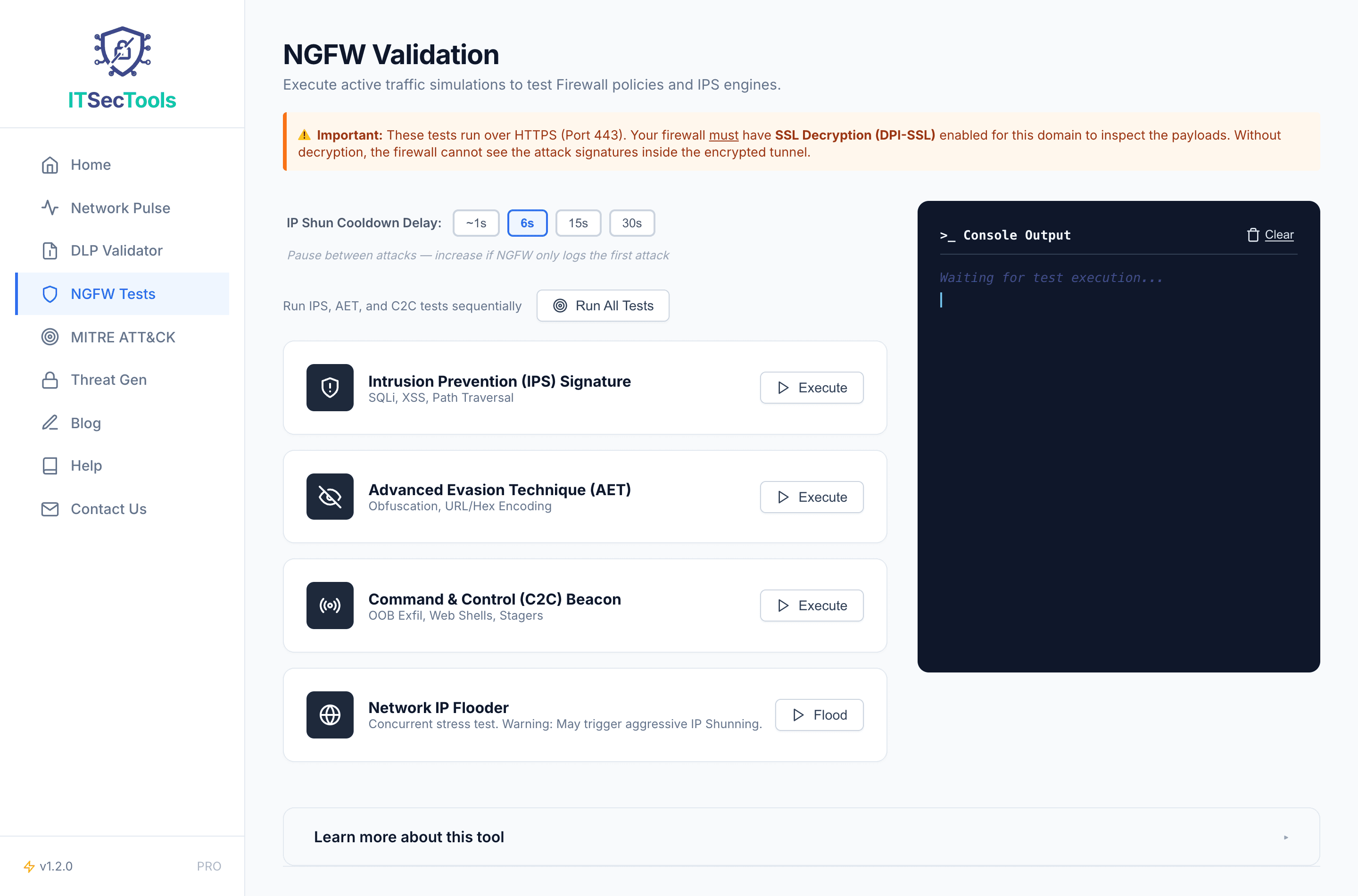
ITSecTools runs entirely in the browser. No agents. No appliances. Tests are delivered over HTTPS, which means you're simultaneously validating that your firewall's SSL/TLS decryption is working. If the firewall isn't decrypting, it can't inspect, and the test will tell you.
You get 4 test suites:
- IPS Signatures: Known exploit patterns that your IPS should catch
- Advanced Evasion Techniques (AET): Fragmentation and obfuscation methods that test deep inspection
- Command & Control (C2): Simulated C2 beacon patterns to validate outbound threat detection
- Flooder: Traffic volume tests for rate-limiting and DoS mitigation
ITSecTools also detects mid-stream body termination— when a firewall kills the connection partway through a response rather than blocking it cleanly. This is a common behavior in inline deployments and helps you understand exactly how your NGFW is enforcing policy.
5. MITRE ATT&CK Simulation
What most tools do
Atomic Red Team requires a PowerShell agent on the target machine. CALDERA needs a full server deployment. Both are excellent frameworks, but they demand infrastructure, setup time, and endpoint access that isn't always available — especially when you just need a quick validation of network-layer detection.
What ITSecTools does differently
ITSecTools delivers a one-click, 4-stage kill chain simulationdirectly from the browser. No agents to install. No servers to configure. Each stage maps to MITRE ATT&CK techniques, and your NGFW, proxy, or SIEM should be generating alerts at each step. If it doesn't, you know exactly which stage of the kill chain your detection is missing.
This isn't a replacement for full red team exercises. It's a fast, repeatable way to verify that your network security stack is seeing the fundamentals.
6. Threat File Generation
What most tools do
EICAR. That's the standard. It's a known test string that every antivirus engine on the planet recognizes. It proves your AV is running. It proves almost nothing else.
What ITSecTools does differently
ITSecTools goes well beyond EICAR. You can download heuristic malware samples that test behavioral detection, ransomware simulators that validate your anti-ransomware controls, and OLE and ANI exploit samples that test whether your security stack catches known document and cursor exploits.
The point isn't to replace a malware sandbox. It's to verify that your gateway, proxy, or endpoint protection catches threats beyond the one test file that every vendor has been signature-matching since 2004.
The Bigger Picture
Most security testing tools solve one problem. ITSecTools was designed for the security engineer who needs to validate an entire stack — DLP, NGFW, IPS, threat detection, and MITRE coverage — without juggling 6 different tools, 3 agents, and a hardware appliance.
Everything runs from the browser. Everything is free. And features like dynamic test data generation and endpoint DLP detection simply don't exist anywhere else.
| Capability | Typical Tools | ITSecTools |
|---|---|---|
| DLP upload testing (5 methods) | Single method | Yes |
| Evasion payloads (Base64, AES, ZIP) | No | Yes |
| MIP label / metadata inspection | No | Yes |
| Endpoint DLP agent detection | No | Yes |
| Dynamic test data generation (12 combos) | No | Yes |
| Multi-vendor DLP regex translation | No | Yes |
| Browser-based NGFW/IPS testing | Appliance required | Yes |
| SSL decryption validation | Rarely | Built-in |
| One-click MITRE ATT&CK kill chain | Agent required | Yes |
| Threat samples beyond EICAR | Limited | Yes |
Stop testing your DLP with a single file upload. Stop trusting EICAR to validate your threat detection. Test the full surface.
Try ITSecTools Free →