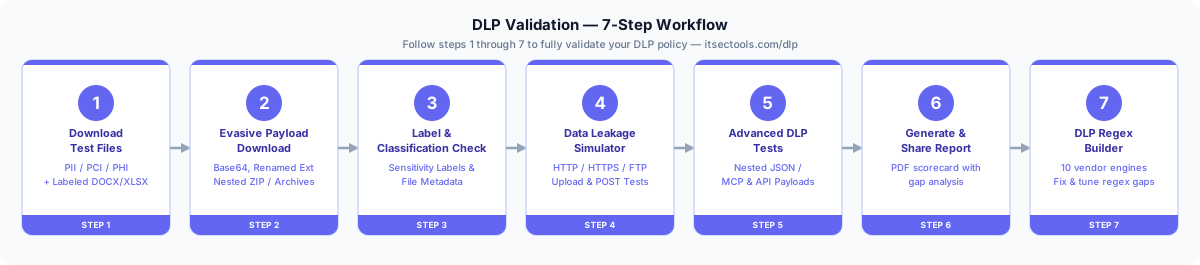
Your DLP Regex Works in Testing but Breaks in Production — Here's Why
The Vendor Engine Problem Nobody Warns You About
What most tools do
Generic regex testers compile against standard PCRE or JS engines. They don't warn you when your Forcepoint pattern with a negative lookbehind gets silently rejected by Zscaler's RE2 limits, leading to unprotected data.
What ITSecTools does differently
Validates and translates your DLP policies across 10 specific vendor engines. It flags incompatible vendor constructs before deployment, ensuring your regex actually fires in production.
10 Vendor Engines — The Only Free Tool That Covers Them All
- Forcepoint DLP — PCRE-based; full lookaround, backreferences, named groups
- Forcepoint DSPM — Modified PCRE with cloud-specific complexity constraints
- Symantec DLP — Java regex engine; most PCRE features with Java syntax differences
- Palo Alto Networks — Custom engine with PCRE subset; limited lookbehind length
- Zscaler — RE2-based; no lookaround, no backreferences, linear-time matching
- Netskope — RE2-based with extensions; limited lookahead in newer versions
- Trellix DLP — PCRE with proprietary extensions for structured data
- Fortinet — Custom engine; basic PCRE, strict pattern length limits
- Microsoft Purview — .NET flavor; unique character class subtraction syntax
- Proofpoint — PCRE-based with content-type-aware matching modes
regex101.com is great for generic regex testing. But it has no concept of DLP vendor engines. It won't warn you that your Forcepoint pattern will fail in Zscaler. ITSecTools validates against the actual engine constraints and flags incompatible constructs before you deploy a broken policy.
Regex Creator — Build Patterns Without Writing Regex
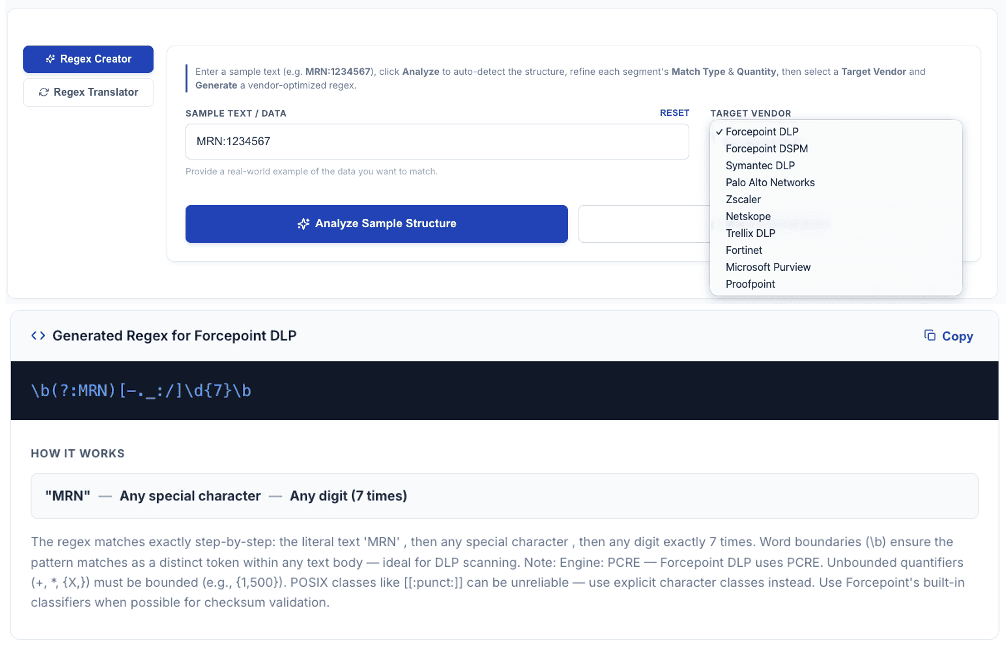
Not every DLP admin is a regex expert — and they shouldn't have to be. The Regex Creator lets you paste a sample string (like a Medical Record Number "MRN:1234567"), auto-segments it into components, and lets you define each segment using 27 intuitive match types (digits, letters, alphanumeric, specific character sets, optional segments, repeating groups).
Select your target DLP engine, and the tool generates a vendor-optimized regex ready to paste directly into your policy. No manual regex tuning. No wondering if your pattern will work in production.
Regex Translator — Convert Between Vendors Instantly
Migrating from Forcepoint to Zscaler? Converting patterns from a security blog written for Symantec? Paste your existing regex, select source and target engine, and the translator handles the conversion — replacing unsupported constructs with equivalent alternatives, adjusting syntax, and flagging anything that can't be translated without a functional change.
Example: translating a Forcepoint pattern with variable-length lookbehind to Zscaler's RE2 requires restructuring to use alternation or anchoring instead. The translator does this automatically and documents the scope change so you can verify the behavior.
Token-by-Token Failure Diagnostics
When a regex doesn't match what you expect, the typical experience is: stare at the pattern, try random changes, hope for the best. ITSecTools shows you exactly which token failed and why. It walks through the regex one token at a time, pinpointing the failure: "Token 4 expects a digit class but encountered a hyphen at position 12."
It also provides plain English explanations of what each part of the regex does. Audit patterns written by other team members or inherited from a previous DLP deployment without being a regex expert. This alone saves hours of debugging time per pattern.